
Get documents signed and work approved without the chasing
Send engagement letters and forms for electronic signature, route work through internal and client approvals, and see exactly who has done what. All of it lives on the client file, inside the software you already run your practice in.
Engagement letter
Quick SendSignature
Date
- Send in four steps
- Reusable templates
- One-click reminders
- Audit trail kept
7-day free trial on Starter, Professional and Advanced. Set up in minutes.
One feature that replaces a standalone e-signature subscription
Most practices pay for an e-signature tool, then still chase approvals by email. In Portal 360 both are part of the client record.
- Separate e-signature subscription
- Approval emails and reply chains
- Spreadsheet of who has signed
Without it
- Export the engagement letter and upload it to another tool
- Re-enter the signer's name and email every time
- Drag the same signature boxes onto every document
- Email the client to ask if they got it
- Hunt for the signed copy and file it by hand
With Portal 360
- Send straight from the client file in four steps
- Save the field layout once as a template
- Quick Send or schedule it in seconds
- Remind signers with one click
- Track every document by status, with the audit trail kept
Send for signature
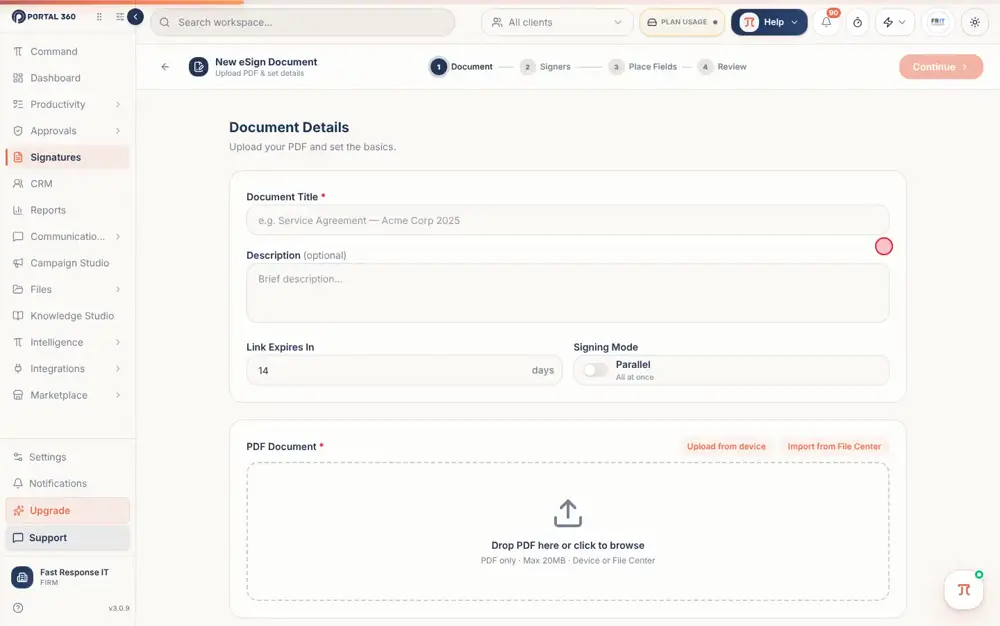
From PDF to sent in four steps
Upload the document, add the signers, place the signature, date and text boxes, then review and send. Your work saves as a draft as you go, so you can leave and pick it up later. Nothing goes out until you press Send.
- Document, Signers, Place Fields, Review
- Drafts are saved automatically
- PDF files up to 20MB
- Save your field layout as a template
Templates and Quick Send
Place the boxes once, reuse them forever
A template stores your signature, date and text box positions and your sending defaults. Then Quick Send does the rest: choose the document, the template and the recipients, and send now or schedule it.
- Save a layout while you place fields
- Templates for engagement letters and recurring forms
- Quick Send emails recipients straight away
- Schedule documents to go out later
Engagement letter
Quick SendSignature
Date
See it with your own clients.
7-day free trial on Starter, Professional and Advanced. Set up in minutes.
Track and remind
See every document and every signer at a glance
Status tabs show where everything is: Draft, Scheduled, Sent, In Progress, Completed, Declined, Expired or Voided. Nudge anyone who has not signed with Remind, and void a document you no longer need without losing the history.
- Search, filter and switch between list and grid
- Remind signers who have not signed
- Void instead of delete, so the audit trail stays
- Completed documents stay on the client file
Signatures
- Engagement letter, Harbour & Co2 of 2 signedCompleted
- Director declaration, Rivera Trust1 of 2 signedIn progress
- Tax authority form, Kestrel Pty LtdWaiting on 1 signer Remind
Approvals
Review work before it moves on
Mark a task status as needing sign-off and moving a task into it creates the request. Internal Review goes to your own staff. Clients Review goes to the client's portal contacts. Approvers add a note, or give a reason when they reject, so the task owner knows exactly what to fix.
- Internal approvals for your team
- Client approvals through the client portal
- Comments on approval, required reason on rejection
- Counters show what is pending, approved and rejected
Approval request
PendingPrepare FY financial statements
Harbour & Co Pty Ltd · Moved to Internal Review
- Internal reviewPriya approved. Numbers tie to the ledger.
- Client reviewSent to the client's portal contacts
- ReleasedReady to lodge
2
Pending
14
Approved
1
Rejected
Everything included, nothing to bolt on
All of this is part of Portal 360, on the same client record as the rest of your practice.
Four-step sending
Document, Signers, Place Fields and Review, with a draft saved along the way.
Signature, date and text fields
Drag the boxes exactly where the signer needs them.
Quick Send
Pick the document, template and recipients and send or schedule in one screen.
Scheduled sending
Prepare documents now and have them go out when you choose.
Reminders
Nudge anyone who has not signed without writing another email.
Nine statuses
Draft through to Completed, Declined, Expired and Voided, all filterable.
Audit trail
Documents are voided, never deleted, so the record of what happened stays.
Internal reviews
Route a task to your own staff for approval before it moves on.
Client approvals
Ask the client to approve work through their portal, with the answer on the file.
How it works
- 1
Upload the document
Add the PDF, or start from a saved template for the same kind of document.
- 2
Add the signers
Choose who signs and who receives the document.
- 3
Place the fields
Drag signature, date and text boxes onto the page. Save the layout as a template if you will use it again.
- 4
Review and send
Check everything, then send. Watch the status change as people sign.
Part of one platform, not another tab
Everything here works with the rest of Portal 360, so the work you do in one place shows up where it matters.
Frequently Asked Questions
PDF files up to 20MB. Upload the document, add the signers and place the signature, date and text boxes where you need them.
Stop chasing signatures. Start your free trial.
Send your first document for signature in minutes and see how it feels when approvals run themselves.
7-day free trial on Starter, Professional and Advanced. Set up in minutes. Or talk to our team.